Local SEO Basics: What is Google My Business?
In the modern digital landscape, the way consumers interact with local businesses has undergone a radical transformation. Gone are the days of flipping through a heavy printed directory or driving around a neighborhood to find a specific service. Today, the journey starts with a smartphone. Whether someone is looking for a “plumber near me,” the best “Italian restaurant in downtown,” or a “boutique clothing store,” the vast majority of these inquiries begin on a search engine.
This is where Local SEO (Search Engine Optimization) comes into play. Local SEO is the practice of optimizing your online presence to attract more business from relevant local searches. While traditional SEO focuses on improving your website’s visibility on a national or global scale, local SEO is hyper-targeted. It aims to ensure that when people in your immediate vicinity search for the products or services you offer, your business is the one they see first.
Read: The Best WordPress Gallery Plugins
At the heart of this local search ecosystem lies one tool that is more influential than any other: Google Business Profile, formerly known and still widely referred to as Google My Business. This platform is the bridge between a digital search and a physical visit. It is the digital storefront that provides potential customers with everything they need to know—your hours, your location, your reputation, and your brand personality—before they even step foot through your door.
For any business owner, understanding how to leverage this tool is no longer optional; it is a fundamental requirement for survival in a competitive market. In this comprehensive guide, we will explore the depths of Google Business Profile, how it integrates with local search, and how you can master it to dominate your local market.
Read: Best Free WordPress Themes
What is Google My Business / Google Business Profile?
Google Business Profile (GBP) is a free tool provided by Google that allows business owners to manage how their business information appears across Google products, including Google Search and Google Maps. For years, this tool was known as Google My Business (GMB), and while the name changed to Google Business Profile to reflect a more streamlined management experience, the core functionality remains the same: it is your official identity on the world’s most popular search engine.
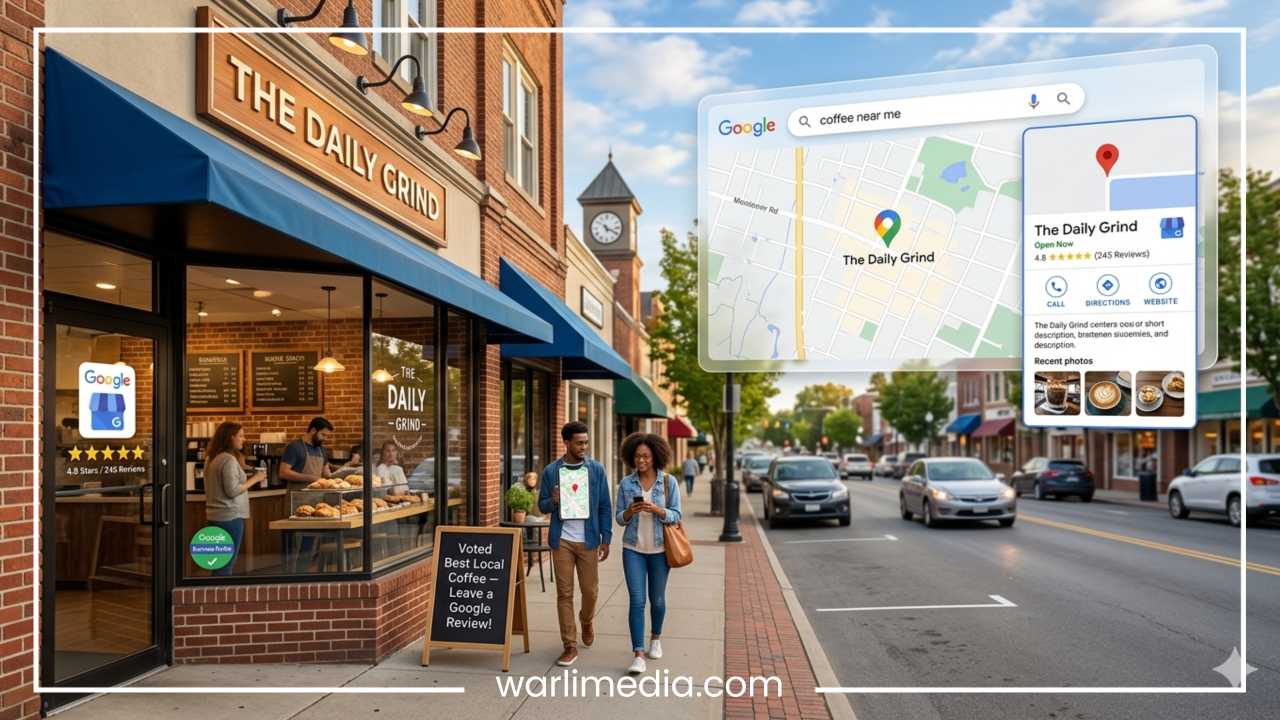
When you search for a business by name or search for a category of business (like “coffee shops”) on Google, you often see a detailed box appearing on the right side of the search results or a map with pinned locations. This is the Google Business Profile in action. It acts as a centralized hub for your business’s vital statistics.
Read: How to Create a WordPress Child Theme
Where Does It Appear?
A Google Business Profile manifests in three primary areas:
Google Search (Knowledge Panel): When a user searches specifically for your business name, a dedicated “Knowledge Panel” appears on the right side of the desktop results (or at the top on mobile). This provides an immediate snapshot of your business, including photos, buttons to call or visit your website, and your physical address.
Google Maps: This is perhaps the most critical placement for mobile users. When someone explores an area on Google Maps or searches for a service within the app, your GBP listing appears as a pin on the map. Users can get GPS directions directly to your storefront with a single tap.
The Local Pack (The 3-Pack): When a user performs a “discovery” search—such as “dentist in Chicago”—Google displays a map followed by three specific business listings. These three spots are the most coveted real estate in local SEO because they appear above the standard organic website links.
For example, imagine a tourist in a new city searching for “breakfast spots.” They aren’t looking for a corporate website; they are looking for a place that is open right now, has good reviews, and is within walking distance. The Google Business Profile provides all that data instantly, making it the primary driver of “near me” conversions.
Why Google Business Profile is Important for Local SEO
The importance of a Google Business Profile cannot be overstated. It is often the first—and sometimes the only—interaction a customer has with your brand before making a purchase decision. Here is why it is the cornerstone of your local digital strategy.
Increased Visibility and the Local Pack
Most users do not click past the first page of search results. In fact, many do not even scroll past the first few results. Because Google places the “Local Pack” (the top three listings) at the very top of the page, having an optimized GBP is the fastest way to get your business in front of thousands of eyes. Without a profile, you are essentially invisible to anyone who doesn’t already know your exact website address.
Competing with Big Brands
Local SEO is the great equalizer. While a small, independent hardware store might never outrank a massive national retailer for a broad keyword like “power tools,” they can absolutely outrank them for “hardware store near me.” Google’s algorithm prioritizes local relevance and proximity, giving small businesses a fighting chance to capture local intent.
Driving Direct Action
Unlike a standard website link, a GBP listing is designed for immediate action. It includes “Click-to-Call” buttons for mobile users, “Request a Quote” features, and integrated “Directions” through Google Maps. This removes friction from the customer journey, turning a searcher into a lead in seconds.
Building Trust Through Social Proof
One of the most prominent features of a GBP is the review section. In an era where 90% of consumers read online reviews before visiting a business, your Google rating is your digital reputation. A profile filled with positive reviews and active owner responses builds immediate credibility. It tells the customer that you are active, reliable, and valued by the community.
Ranking Factors
Google has explicitly stated that a well-optimized and verified Business Profile is a significant ranking factor in local search. By providing Google with accurate and detailed information, you are making it easier for their algorithm to trust your business and recommend it to users.
Key Features of Google Business Profile
To maximize the potential of your profile, you must understand the various components that make it up. A complete profile is far more than just a name and a phone number.
1. NAP (Name, Address, Phone)
This is the foundation of local SEO. Your business name must be your real-world name, your address must be accurate, and your phone number should be a local line if possible. Consistency is key here; the way your NAP appears on Google should match exactly how it appears on your website and other directories.
2. Business Category
Choosing the right primary category is perhaps the most important setting for relevance. If you run a “Deep Dish Pizza Restaurant,” don’t just settle for “Restaurant.” Be as specific as possible. You can also add secondary categories to cover other aspects of your business.
3. Reviews and Ratings
This section allows customers to leave a star rating and a written testimonial. As a business owner, you have the ability to respond to these reviews. Engaging with your customers here shows that you value feedback and improves your “Prominence” score in Google’s eyes.
4. Photos and Videos
Profiles with photos receive significantly more requests for directions and website clicks than those without. You should include high-resolution shots of your exterior (to help people find you), your interior (to show the vibe), your products, and your team.
5. Operating Hours
There is nothing more frustrating for a customer than driving to a store only to find it closed. Google allows you to set regular hours and “Special Hours” for holidays or events. Keeping this updated is vital for maintaining customer trust.
6. Posts and Updates
Think of this as a mini-social media feed within your Google listing. You can share “What’s New” posts, offer coupons, or promote upcoming events. These posts appear directly in your profile and can grab the attention of someone who is still in the “browsing” phase.
7. Q&A Section
This is a community-driven feature where users can ask questions about your business. Proactive business owners will often post their own “Frequently Asked Questions” and answer them themselves to ensure that accurate information is always available.
How Google My Business Works in Local Search Ranking
Understanding how Google decides which businesses to show in the top three results is essential for any strategy. Google’s local algorithm is based on three primary pillars: Relevance, Distance, and Prominence.
Relevance
Relevance refers to how well a local business profile matches what someone is searching for. If you provide detailed and complete business information, Google can better understand your business and match your profile to relevant searches. This is why using keywords naturally in your business description and selecting the correct categories is so important.
Distance
This is a factor you cannot control, but it is highly influential. Distance considers how far each potential search result is from the location term used in a search. If a user doesn’t specify a location (e.g., they just search “bakery”), Google will calculate distance based on what it knows about the user’s current location via GPS or IP address.
Prominence
Prominence refers to how well-known a business is. Some places are more prominent in the offline world, and search results try to reflect this in local ranking. For example, famous museums, landmark hotels, or well-known retail brands are likely to be prominent in local search results.
Prominence is also based on information that Google has about a business from across the web, such as links, articles, and directories. Google review count and review score factor into local search ranking. The more reviews and positive ratings you have, the better your business’s local ranking will likely be. Your position in web results is also a factor, so standard SEO best practices apply.
How to Set Up a Google Business Profile (Step-by-Step Guide)
Setting up your profile is a straightforward process, but it requires attention to detail. Follow these steps to ensure a solid start.
Step 1: Sign In or Create a Google Account
You should use a professional business email address rather than a personal one. Go to the Google Business Profile website and click “Manage Now.”
Step 2: Enter Your Business Name
Start typing your business name. If it doesn’t appear in the drop-down menu, click “Add your business to Google.” Ensure the spelling matches your signage and legal documents.
Step 3: Choose Your Business Type
You will be asked if you are an online retail store, a local store (physical location), or a service business. Select all that apply.
Step 4: Select Your Category
As mentioned earlier, be specific. You can change this later, but try to pick the most accurate primary category from the start.
Step 5: Enter Your Location or Service Area
If you have a brick-and-mortar store, enter your address. If you are a plumber or a mobile dog groomer who visits customers, you can hide your address and instead list the “Service Areas” you cover (e.g., specific cities or zip codes).
Step 6: Add Contact Information
Provide your phone number and your website URL. If you don’t have a website, Google offers a basic one based on your profile information, though having your own domain is always better for SEO.
Step 7: Verify Your Business
Google needs to know you are the actual owner. The most common method is receiving a postcard by mail at your business address with a verification code. In some cases, you may be able to verify via phone, email, or video call. This process can take a few days to two weeks.
Step 8: Optimize
Once verified, do not leave the profile empty. Fill out every single field, add your photos, and set up your services.
How to Optimize Your Google Business Profile
Verification is just the beginning. To truly outrank your competitors, you need an optimization strategy.
Complete Every Data Point
Google favors profiles that are 100% complete. This includes your business description, attributes (like “Free Wi-Fi” or “Wheelchair accessible”), and the date your business first opened.
Use Keywords Strategically
In your business description, write for humans first, but include relevant keywords. If you are a “Yoga Studio,” mentions of “Hatha yoga,” “vinyasa classes,” and “beginner yoga” help Google understand the breadth of your services. However, avoid “keyword stuffing,” which is the practice of listing words without context.
High-Quality Visual Content
Update your photos regularly. Don’t just use stock photos; show your actual team, your actual products, and the exterior of your building. Profiles with more than 100 photos get significantly more interactions than those with fewer.
Master the Review Loop
You must be proactive about reviews. Ask happy customers to leave feedback. Most importantly, respond to every review, both positive and negative. When you respond to a negative review with professionalism and a desire to fix the problem, it shows prospective customers that you are accountable.
Leverage Google Posts
Use the “Posts” feature at least once a week. Whether it’s a “Product” post showing a new arrival or an “Update” post about a change in hours, this activity signals to Google that your business is active.
Enable Messaging
Google allows customers to message you directly through your profile. If you have the capacity to respond quickly, enable this feature. It provides an immediate line of communication that can close a sale before a customer even looks at a competitor.
Common Mistakes to Avoid
Even with the best intentions, many businesses fail at local SEO by making simple errors.
Inconsistent NAP: If your address is “123 Main Street” on Google but “123 Main St.” on Yelp and “123 Main” on your website, it can confuse search engines. While they are getting smarter at recognizing variations, perfect consistency is still the gold standard.
Selecting Too Many Categories: It might be tempting to select every category that is tangentially related to your business, but this dilutes your relevance. Stick to one primary category and a few highly relevant secondary ones.
Ignoring the Q&A Section: Anyone can answer questions on your profile. If you don’t monitor this section, a random user might provide incorrect information about your prices or services.
Using a PO Box: Google requires a physical location for brick-and-mortar listings. Using a PO Box or a virtual office address can lead to your profile being suspended.
Buying Fake Reviews: This is a violation of Google’s terms of service and can result in your business being permanently removed from Google Maps. Organic, honest growth is the only sustainable path.
Benefits of Using Google Business Profile for Local SEO
The return on investment for the time spent managing a Google Business Profile is immense. Because the tool is free, it represents some of the most cost-effective marketing available.
Higher Search Visibility
By appearing in the Local Pack and on Maps, you are capturing the “high intent” traffic. These are people who are ready to buy or visit right now.
Improved Customer Insights
The “Insights” or “Performance” tab in your GBP dashboard provides a goldmine of data. You can see how many people called you, how many asked for directions, and even the keywords people used to find your listing.
Enhanced Trust and Creditivity
A verified profile with updated photos and active reviews acts as a “seal of approval.” It legitimizes your business in the digital space.
Free Lead Generation
For many local businesses, their GBP listing generates more phone calls and leads than their actual website. It serves as a secondary homepage that is optimized for conversion.
Final Thoughts
In the realm of local SEO, the Google Business Profile is the most powerful weapon in your arsenal. It is the first point of contact for the modern consumer and the primary way Google understands your physical presence in the world.
By taking the time to claim your profile, verify your details, and consistently optimize your content, you are doing more than just “filling out a form.” You are building a digital asset that works 24/7 to bring customers to your door. The world of search is becoming increasingly localized, and those who ignore their Google Business Profile risk being left behind by more tech-savvy competitors.
If you are a local business owner, the takeaway is simple: your GBP is non-negotiable. Start today by auditing your current information, uploading five new photos, and reaching out to your best customers for a review. Small, consistent efforts in local SEO lead to massive long-term results.
Frequently Asked Questions
Is Google Business Profile free?
Yes. There is no cost to create, claim, or manage a Google Business Profile. Any company or individual claiming to be from Google and asking for a fee to manage your listing is likely a scammer.
How long does verification take?
The most common method is via a physical postcard, which typically arrives within 5 to 14 business days. Once you enter the code from the postcard, your profile usually goes live within 24 hours.
Does Google Business Profile help with my website’s SEO?
Directly, it helps your local ranking. Indirectly, it can drive more traffic to your website, which improves your site’s authority and can positively impact your organic search rankings over time.
Can I use Google Business Profile if I don’t have a physical store?
Absolutely. If you operate a service-area business (like a mobile locksmith or a cleaning service) and work at customers’ locations, you can list your business and specify the areas you serve without revealing your home address.
Why was my Google Business Profile suspended?
Suspensions usually happen due to violations of Google’s guidelines. Common reasons include using a fake name, using a PO Box address, or having multiple profiles for the same business at the same location. If suspended, you must fix the issue and submit a reinstatement request.