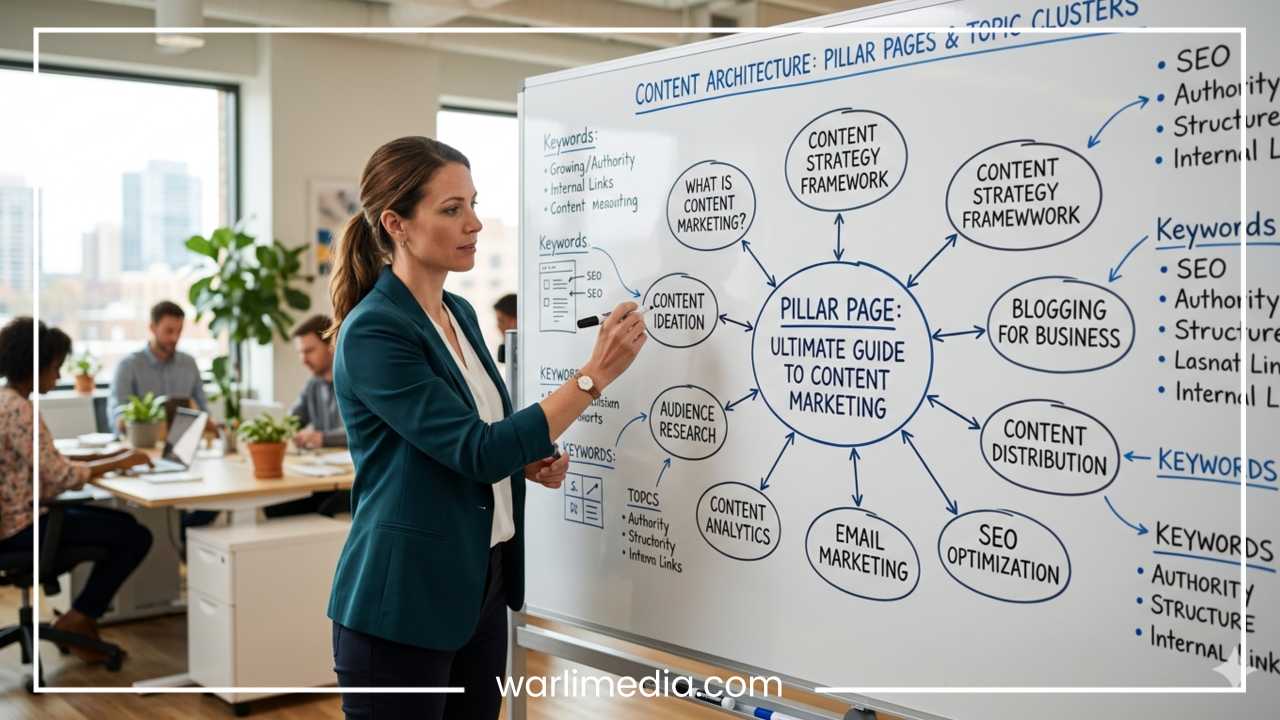
Pillar Pages and Topic Clusters Explained: The Modern Blueprint for Content Authority
In the early days of digital marketing, Search Engine Optimization (SEO) was often compared to a game of numbers. If you wanted to rank for a specific term, you wrote a blog post, stuffed it with that exact keyword, and hoped for the best. Content libraries grew horizontally; websites became cluttered with hundreds of short, disjointed articles that lived in silos. This “random acts of content” approach relied on the hope that Google would pick up individual pages based on sheer keyword density.
However, as search engines evolved, they moved away from simple string matching toward a more sophisticated understanding of intent and context. Google’s algorithms, such as Hummingbird and RankBrain, shifted the focus toward semantic search—understanding the meaning behind a query and the relationship between different concepts. This meant that high-ranking sites were no longer just those with the most keywords, but those that demonstrated the highest level of topical authority.
Read: How to Create WordPress Sitemap
To keep up with this shift, savvy marketers transitioned to a modern content architecture known as the Pillar-and-Cluster model. This strategy moves away from scattered blog posts and toward an organized, hierarchical structure. At its heart are Pillar Pages—broad, authoritative resource hubs—and Topic Clusters—supporting articles that dive deep into specific subtopics.
By organizing content into these logical groups, you tell search engines exactly what your website is about and why you are an expert in your field. This article will explain how pillar pages and topic clusters work, why they matter for your search visibility, and how to build a robust content ecosystem that stands the test of time.
What Are Pillar Pages?
A pillar page is the foundation of a topic cluster. It is a comprehensive, high-level resource page that covers a broad core topic in depth. Unlike a standard blog post that might focus on a narrow question, a pillar page aims to provide a 10,000-foot view of a large subject area. It touches upon all the relevant aspects of the topic while leaving room for more specific details to be covered in supporting cluster content.
Read: Top 10 SEO WordPress Plugins
Characteristics of a Pillar Page
Broad Topic Coverage: A pillar page focuses on a core “umbrella” term. For example, instead of focusing on “How to write a meta description,” a pillar page would cover “The Complete Guide to On-Page SEO.”
High-Level Overview: While the page is long, it doesn’t necessarily get into the weeds of every single sub-step. It provides enough information to satisfy a general inquiry while signaling that more specific information is available elsewhere on the site.
Centralized Internal Linking: Every pillar page serves as a hub. It contains links out to all related subtopic articles (clusters) and, in turn, receives links back from those articles.
Read: How to Add a Favicon to Your WordPress Website
Types of Pillar Pages
Not all pillar pages are structured the same way. Depending on your business goals and the nature of your industry, you might choose one of the following formats:
The Resource Pillar Page: Often used as a “Start Here” guide, this page is heavy on links. It organizes a vast amount of information into categories, making it easy for users to find the specific answer they need within a broader subject.
The 10x Content Pillar Page: Popularized by the idea of creating content that is ten times better than anything else currently ranking, this is usually a massive, ungated guide. It is designed to be the ultimate authority on a subject, often featuring original research, high-quality graphics, and interactive elements.
The Service or Product Pillar Page: For B2B or service-based companies, this page might center on a core offering. For instance, a cloud computing company might have a pillar page dedicated to “Enterprise Cloud Solutions,” linking out to specific clusters like security, scalability, and migration.
Example: The Digital Marketing Pillar
Imagine a website that wants to be an authority on digital marketing. Their pillar page would be titled “The Ultimate Guide to Digital Marketing.” Within this page, they would have brief sections on SEO, Email Marketing, Social Media, and Paid Ads. Each of these sections would link to a more detailed, dedicated article on that specific subtopic. In this sense, pillar pages are the “content hubs” of your website.
What Are Topic Clusters?
If the pillar page is the trunk of the tree, the topic clusters are the branches. A topic cluster is a group of related content pieces that orbit a single pillar page. While the pillar page stays broad, the cluster pages go deep.
Definition and Purpose
Topic clusters are designed to answer specific long-tail search queries. While fewer people may search for “how to optimize images for mobile” compared to “SEO,” the person searching for the former has a very specific intent. By creating a cluster page for that specific query, you provide immense value to the user and prove to search engines that your knowledge of the broader topic is exhaustive.
The Role of Specificity
Each cluster page should focus on a single subtopic mentioned on the pillar page. If your pillar is about “Remote Work,” your cluster pages might include:
The best tools for remote collaboration
How to manage a distributed team
Ergonomic setups for home offices
The legalities of hiring across borders
The Power of Internal Linking
The defining feature of a topic cluster is the linking structure. For the system to work, every cluster page must link back to the pillar page using consistent anchor text. This creates a “loop.”
Cluster → Pillar: Tells Google that the pillar page is the ultimate authority on the subject.
Pillar → Cluster: Helps users find deep-dive information and helps search engine crawlers discover every page in the ecosystem.
Depth Without Clutter
One of the biggest benefits of clusters is that they keep your pillar page clean. You don’t have to explain the history of the internet on your digital marketing pillar page; you can simply link to a cluster page that covers it. This allows the pillar to remain a digestible guide while ensuring the deep-dive information is only a click away for those who need it.
How Pillar Pages and Topic Clusters Work Together
Understanding the relationship between pillars and clusters requires a shift toward system-level thinking. Instead of viewing articles as individual units, you must view them as parts of a machine. This is often referred to as the Hub-and-Spoke model.
The Hub-and-Spoke Model
The pillar page is the “Hub”—the central point of navigation and authority. The cluster pages are the “Spokes”—extending outward to cover every possible nuance of the topic. When these elements are connected via internal links, they form a cohesive network that is much stronger than the sum of its parts.
Content Hierarchy and Search Engine Interpretation
Search engines like Google use crawlers to map out the web. When a crawler lands on a pillar page and sees links to twenty related cluster pages, it understands that your site is a comprehensive resource on that topic.
Topical Authority: By covering every angle of a subject, you build “topical authority.” Google begins to trust your site not just for one keyword, but for the entire concept.
Semantic Relevance: The links between pillars and clusters use descriptive anchor text. This helps the algorithm understand the semantic relationship between terms (e.g., understanding that “keyword research” is a vital sub-component of “content marketing”).
Better Crawl Efficiency: A structured cluster makes it easier for bots to find new content. When you publish a new cluster page and link it to an established pillar, Google finds and indexes that new page much faster.
The “Book” Analogy
To simplify this: imagine your website is a library. A pillar page is like the Table of Contents or the Introductory Chapter of a massive non-fiction book. The topic clusters are the individual chapters that provide the technical details and case studies. You wouldn’t want a book where the chapters are scattered in different rooms; you want them bound together in a logical order. The pillar-cluster model is that binding.
Why This Strategy Works for SEO
The move toward topic clusters isn’t just a design preference; it is a direct response to how modern search algorithms function. Here is why this strategy is a powerhouse for SEO performance.
1. Improves Topical Authority
Search engines no longer rank pages in a vacuum. They look at the overall “expertise” of a domain. If you have one great article on “Healthy Eating” but the rest of your site is about “Car Repairs,” you lack topical authority. However, if you have a pillar page on “Nutrition” supported by fifty cluster pages on macros, vitamins, and meal prep, Google views you as a trusted source in the health niche.
2. Increases Dwell Time and User Engagement
When a user arrives on a pillar page, they are often at the beginning of their journey. As they read, they find links to specific subtopics that interest them. This encourages “click-throughs” within your own site. High dwell time and multiple page views per session are strong signals to search engines that your content is valuable and relevant, which can lead to higher rankings.
3. Boosts Internal Linking and PageRank Flow
Internal linking is one of the most underrated SEO tactics. In a cluster model, the “link juice” (PageRank) is distributed effectively. If one cluster page happens to go viral and earns many external backlinks, some of that authority flows back to the pillar page and, subsequently, down to the other cluster pages. This “lifts all boats” across the entire topic group.
4. Targets Long-Tail Keywords
While the pillar page targets “head” terms with high search volume (and high competition), the clusters target long-tail keywords. Long-tail keywords often have lower volume but much higher conversion rates because the user’s intent is more specific. The cluster model allows you to capture traffic from both the broad and the specific ends of the spectrum simultaneously.
5. Reduces Keyword Cannibalization
Keyword cannibalization happens when multiple pages on your site compete for the same keyword, confusing search engines and diluting your ranking power. The cluster model solves this by giving every page a unique, specific job. There is one pillar for the broad term and individual clusters for the variations. This ensures you aren’t competing with yourself in the Search Engine Results Pages (SERPs).
How to Build a Pillar Page (Step-by-Step)
Creating a successful pillar page requires more planning than a standard blog post. It is a marathon, not a sprint. Follow these steps to build a page that serves as a true authority hub.
Step 1: Choose a Core Topic
Your core topic should be broad enough to support at least 10 to 20 subtopics, but not so broad that it becomes meaningless. “Marketing” is too broad. “Instagram Marketing for Small Businesses” is a perfect core topic. It has enough depth to warrant a pillar page but is specific enough to attract a defined audience.
Step 2: Conduct Exhaustive Research
Use keyword research tools to find the primary terms people use when searching for your core topic. Look for “Information” intent keywords—questions starting with “what,” “how,” and “why.” At this stage, you aren’t just looking for one keyword; you are looking for a “keyword universe” that surrounds your topic.
Step 3: Identify Your Subtopics (Cluster Ideas)
Brainstorm all the questions someone might have about your core topic. If your topic is “Email Marketing,” your subtopics might be:
Building a subscriber list
Writing subject lines
A/B testing emails
Avoiding spam filters
Email automation workflows
Step 4: Create the Pillar Page Structure
A pillar page should be easy to navigate. Use a clear table of contents with “jump links” that take users directly to specific sections. Each section should provide a solid summary of a subtopic and include a prominent link to the dedicated cluster article for that subtopic.
Step 5: Write In-Depth, Evergreen Content
Write content that is designed to stay relevant for years. Avoid referencing specific dates or fleeting trends unless necessary. Focus on the fundamental principles of the topic. The goal is to make this the “ultimate” resource that people will want to bookmark and return to.
Step 6: Optimize for On-Page SEO
Title Tags: Use your core keyword early in the title.
Headings (H1, H2, H3): Use a logical hierarchy. Your H1 is the title, H2s are the main subtopics, and H3s are the details within those subtopics.
Featured Snippets: Write clear, concise definitions for your subtopics to increase the chances of appearing in Google’s “Position Zero.”
How to Build Topic Clusters
Once your pillar page is live (or at least mapped out), it is time to build the supporting cast. Topic clusters are where you get to show off your technical expertise.
Picking Cluster Topics
Use your research from the previous phase. Every “long-tail” keyword you found that was too specific for the pillar page is now a candidate for a cluster article. Ensure that each topic is distinct enough that it doesn’t overlap too heavily with another cluster page.
Writing Focused Articles
A cluster article should be the “final word” on its specific subtopic. If the article is about “Email Automation Workflows,” don’t spend half the post talking about why email marketing is important (that’s for the pillar page). Dive straight into the workflows, the technical setup, and the best practices.
Linking Back to the Pillar
This is the most critical step. Every cluster article must contain a link back to the pillar page. Use the pillar page’s primary keyword as the anchor text. For example, in an article about “Writing Subject Lines,” you might include a sentence like: “For more tips on succeeding with your campaigns, check out our [Ultimate Guide to Email Marketing].”
Cross-Linking Between Clusters
While the primary connection is between the cluster and the pillar, don’t be afraid to link between cluster pages when it makes sense for the user. If a user is reading about “Subscriber Lists,” they might also be interested in “Lead Magnets.” This creates a “web” of content that keeps users on your site longer.
Common Mistakes to Avoid
Even with the best intentions, it is easy to make mistakes that undermine the effectiveness of your content architecture.
Choosing Too Narrow a Pillar Topic: If you can only think of three subtopics, your core topic is likely a cluster page, not a pillar page. Make sure the topic has enough “meat” to sustain a large ecosystem.
Weak Internal Linking: The entire strategy relies on links. If you forget to link your clusters back to the pillar, search engines won’t see them as a group, and you won’t gain the topical authority benefits.
Creating Clusters Without a Strategy: Don’t just write random blog posts and try to force them into a cluster later. Plan your clusters based on what users are actually searching for.
Overstuffing the Pillar Page: If your pillar page is 15,000 words long and goes into extreme technical detail on every point, it becomes unreadable. Keep the pillar page high-level and move the technical details to the clusters.
Not Updating Content: SEO is not “set it and forget it.” Even evergreen content needs a refresh every now and then to ensure links are working and the advice remains accurate.
Real-World Example: “Content Marketing” Strategy
To see how this looks in practice, let’s map out a strategy for a company that provides marketing software.
The Pillar Page
Title: The Ultimate Guide to Content Marketing
Content: This page defines content marketing, explains its importance, outlines the general process (planning, creation, distribution, measurement), and provides a summary of various content types.
The Topic Clusters
Supporting this pillar, the company writes the following in-depth articles:
Cluster 1: How to Create a Content Marketing Strategy from Scratch (Deep dive into planning).
Cluster 2: 20 Content Distribution Channels You Need to Use (Deep dive into distribution).
Cluster 3: The Best Tools for Content Creation (Specific product recommendations).
Cluster 4: How to Measure Content Marketing ROI (Technical analytics and metrics).
Cluster 5: Blogging for Business: A Step-by-Step Guide (Deep dive into one content type).
The Result
When a user searches for “Content Marketing,” they find the pillar page. When they search for “how to measure content ROI,” they find Cluster 4. In both cases, they enter the company’s ecosystem. Google sees the interconnectivity and ranks the entire site higher for all marketing-related terms.
Final Thoughts
The transition from a keyword-focused strategy to a topic-focused strategy is one of the most important shifts you can make in your SEO journey. Pillar pages and topic clusters allow you to create an organized, user-friendly, and highly authoritative website that search engines love.
By building “hubs” of information and supporting them with deep-dive “spokes,” you provide a better experience for your readers and a clearer map for search engine crawlers. This structure helps you dominate broad search terms while capturing valuable long-tail traffic, all while protecting your site from keyword cannibalization.
Implementing this model requires a significant upfront investment in research and writing, but the long-term rewards in traffic, authority, and rankings are unparalleled. Start by choosing one core topic that is central to your business, map out your first ten cluster ideas, and begin building your authority one link at a time.
Frequently Asked Questions (FAQ)
How many cluster pages should I have for one pillar page?
There is no “magic number,” but a healthy topic cluster usually contains at least 8 to 20 supporting articles. The goal is to cover the topic comprehensively. If the topic is extremely complex, you may end up with dozens of clusters.
Can a cluster page also be a pillar page for a different topic?
Yes. This is known as a “sub-pillar.” For example, “SEO” might be a cluster page for a “Digital Marketing” pillar, but that SEO page could also serve as a pillar for clusters like “Link Building,” “Technical SEO,” and “Keyword Research.”
Should I use the same anchor text every time I link back to the pillar?
It is generally best to use your primary core keyword or a very close variation as your anchor text when linking back to the pillar. This provides a clear and consistent signal to search engines about what the pillar page is about.
Do I need to create all the content at once?
No. You can start with a pillar page and three or four clusters, then gradually add more clusters over time. The “hub-and-spoke” model is meant to grow with your website.
What tools can help me build topic clusters?
Keyword Research Tools: Ahrefs, SEMrush, or Google Keyword Planner to find subtopics.
Visual Mapping Tools: MindMeister or Lucidchart to visualize your hub-and-spoke structure.
Project Management: Notion or Trello to track the production and linking of various cluster pieces.