How to Create an SEO Content Calendar: The Ultimate Strategic Guide
In the world of digital marketing, content is often described as the engine, but SEO is the fuel. However, even the most powerful engine won’t get you far without a map. An SEO content calendar serves as that map. It is the bridge between high-level digital marketing goals and the daily execution of content creation. Without a structured plan, many businesses fall into the trap of “random acts of content”—publishing sporadically, chasing low-value keywords, or failing to align their articles with what their audience is actually searching for.
A well-constructed content calendar ensures that every piece of content you produce serves a specific purpose, targets a viable keyword, and contributes to long-term organic growth. It moves your strategy from reactive to proactive. Instead of wondering what to write about on a Tuesday morning, your team has a documented pipeline of high-intent topics ready for production. This guide will walk you through the comprehensive process of building an evergreen SEO content calendar that drives traffic, builds authority, and converts readers into customers.
Read: Boost Your Website: Top WordPress Widgets You Need
What Is an SEO Content Calendar?
At its simplest level, a content calendar is a schedule of when and where you plan to publish upcoming content. However, an SEO content calendar is significantly more robust. While a standard editorial calendar might focus on catchy titles and social media holidays, an SEO-driven calendar is built upon data. It prioritizes search volume, keyword difficulty, and user intent.
The Core Difference
A regular content calendar is often driven by internal needs (e.g., “We have a product launch, let’s write a post about it”). An SEO content calendar is driven by external demand (e.g., “People are searching for ‘how to automate inventory,’ so we should create a guide that solves that problem”).
Read: How to Turn WordPress Into a Wiki Website
Key Components of an SEO Calendar
To be effective, your calendar must go beyond dates and titles. It should include:
Target Keywords: The primary and secondary keywords each piece aims to rank for.
Search Intent: Whether the user wants information, a specific website, or to buy something.
Content Type: Is it a long-form guide, a listicle, or a case study?
Funnel Stage: Identifying if the content is for Top of Funnel (TOFU), Middle of Funnel (MOFU), or Bottom of Funnel (BOFU) readers.
Topic Clusters: How the piece connects to other content on your site to build topical authority.
Read: Download WordPress Theme Free
Why You Need an SEO Content Calendar
If you want to dominate search engine results pages (SERPs), you cannot rely on inspiration alone. Search engines reward consistency and relevance. A calendar helps you achieve both.
1. Improves Consistency and Cadence
Google’s algorithms favor sites that are updated regularly with fresh, high-quality information. A calendar prevents “content droughts” and ensures your site remains active in the eyes of search crawlers.
2. Strategic Keyword Targeting
Without a plan, it is easy to accidentally target the same keyword multiple times, leading to keyword cannibalization. This is where your own pages compete against each other in search results, diluting your ranking power. A calendar gives you a bird’s-eye view of your keyword footprint, ensuring each page has its own unique territory.
3. Alignment with Business Goals
Content for the sake of content is a waste of resources. A calendar allows you to map your SEO efforts to your sales cycle. If you know a specific service is a priority for the next quarter, you can schedule “feeder” content in the months leading up to it to build authority in 그 area.
4. Better Team Collaboration
SEO is rarely a solo sport. It involves researchers, writers, editors, SEO specialists, and often designers. A centralized calendar provides a “single source of truth,” reducing bottlenecks and ensuring everyone knows their deadlines and responsibilities.
Step 1: Define Your SEO Goals
Before you open a spreadsheet or a project management tool, you must define what success looks like. Your goals will dictate the type of content you prioritize.
Traffic Growth: If your primary goal is sheer volume, you will focus on high-volume, informational keywords (TOFU).
Lead Generation: If you need more sign-ups, you will prioritize “how-to” guides and comparison pieces that address specific pain points (MOFU).
Brand Authority: To become a thought leader, you might focus on original research, white papers, and deep-dive technical pillars.
Product Sales: This requires targeting “commercial intent” keywords where users are looking for reviews, pricing, or “best of” lists (BOFU).
Aligning Goals with KPIs: Ensure your goals are measurable. Use Key Performance Indicators (KPIs) like organic sessions, backlink growth, and conversion rate per organic landing page to track if your calendar is actually working.
Step 2: Identify Your Target Audience
SEO is not about ranking for everything; it is about ranking for what your buyer personas care about.
Create Buyer Personas
Who are you writing for? A CFO looking for enterprise software has different language and needs than a small business owner. Define their demographics, job titles, and, most importantly, their challenges.
Understand Search Intent
Google has become incredibly adept at understanding why someone is searching. Your calendar must match the content format to the intent:
Informational: The user wants to learn (e.g., “What is blockchain?”). Use blog posts and guides.
Navigational: The user wants a specific page (e.g., “Login for X Tool”). Ensure your landing pages are optimized.
Commercial Investigation: The user is comparing options (e.g., “Best SEO tools”). Use listicles and reviews.
Transactional: The user is ready to buy (e.g., “Buy organic coffee beans”). Use product pages.
If you target a transactional keyword with an informational blog post, you will struggle to rank because you aren’t satisfying the user’s intent.
Step 3: Do Keyword Research
Keyword research is the foundation of any SEO content calendar. This is where you discover the language your customers use.
The Research Process
Seed Keywords: Start with broad topics related to your business.
Use SEO Tools: Tools like Google Keyword Planner, Ahrefs, or SEMrush provide data on search volume (how many people search) and difficulty (how hard it is to rank).
Find Long-Tail Keywords: These are longer, more specific phrases (e.g., “best eco-friendly yoga mats for beginners”). While they have lower volume, they often have higher conversion rates because the user knows exactly what they want.
Grouping and Mapping
Once you have a list of hundreds of keywords, group them. Don’t create a new page for “how to wash a car” and “car washing tips.” These should be grouped under one comprehensive “primary keyword” to avoid cannibalization. Every entry in your calendar should have one primary keyword and a handful of secondary (LSI) keywords.
Step 4: Build Topic Clusters
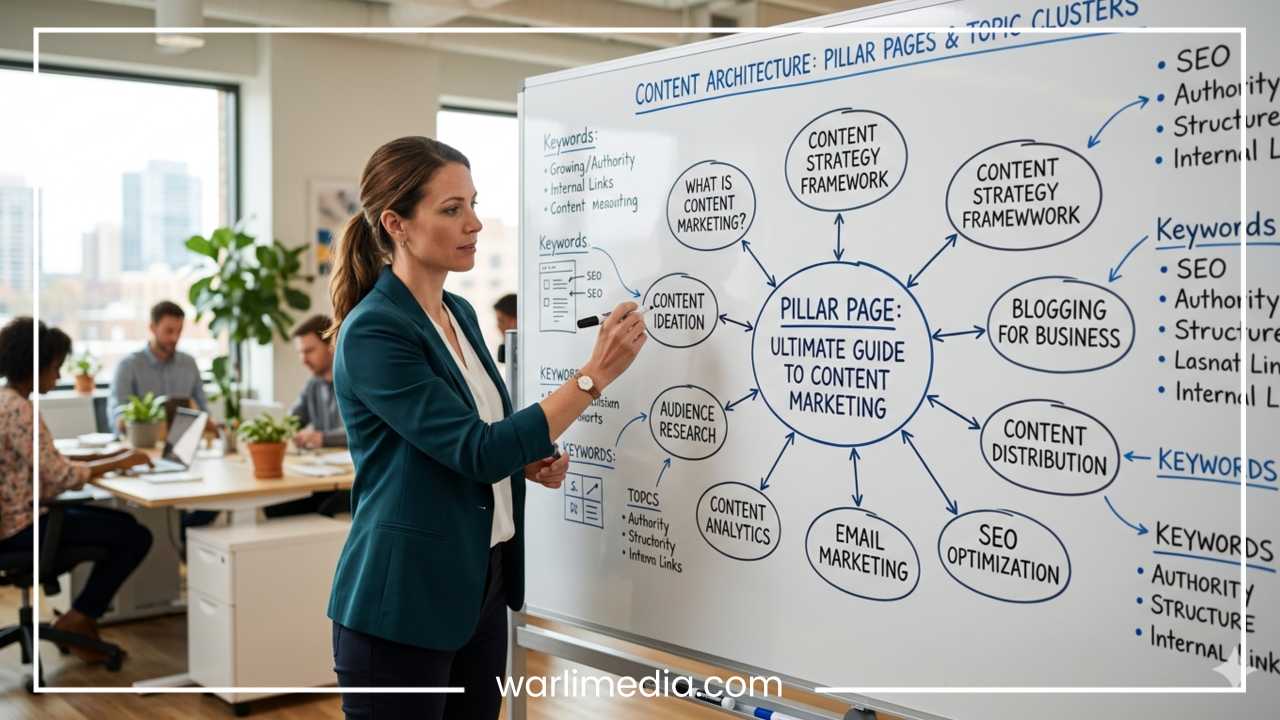
One of the most effective ways to organize an SEO calendar is through the Topic Cluster Model. Instead of writing random posts, you build “hubs” of knowledge.
Pillar Content vs. Supporting Content
Pillar Page: A comprehensive, long-form guide on a broad topic (e.g., “The Ultimate Guide to Digital Marketing”).
Supporting Content: Smaller, more specific articles that dive deep into sub-topics (e.g., “How to Run Facebook Ads,” “Tips for Email Subject Lines”).
The Internal Linking Strategy
The magic of topic clusters lies in internal linking. All supporting articles should link back to the pillar page, and the pillar page should link out to the supporting articles. This tells search engines that your site is an authority on the entire subject, which helps all pages in the cluster rank higher.
Step 5: Plan Content Types & Formats
Different keywords require different formats. Your calendar should specify the “medium” for each topic to ensure the content meets expectations.
Long-form Guides: Great for “Ultimate Guide” style pillars.
Listicles: Excellent for “Top 10” or “Best of” searches; they are highly skimmable and often have high click-through rates.
Case Studies: Vital for BOFU content, proving your product works with real-world data.
Comparison Pages: “X vs. Y” articles are gold for capturing users who are in the final stages of the decision-making process.
Video Repurposing: Note in your calendar if a blog post should also be turned into a video script or an infographic to maximize reach.
Step 6: Create the Content Calendar Framework
Now it’s time to build the actual document. You don’t need expensive software; a simple spreadsheet or a project management tool will suffice.
Essential Calendar Fields
To keep your SEO strategy on track, your calendar should include the following columns:
Working Title: A descriptive name for the piece.
Primary Keyword: The main SEO target.
Search Volume/Difficulty: To remind the team of the “why” behind the topic.
Target URL: The planned slug (e.g., /blog/seo-content-calendar).
Funnel Stage: TOFU, MOFU, or BOFU.
Publish Date: The deadline for going live.
Status: (e.g., Ideation, Drafting, Editing, Design, Scheduled, Published).
Author: The person responsible for the draft.
Choosing Your Tool
Spreadsheets (Google Sheets/Excel): Best for small teams or those who want total customization.
Kanban Boards (Trello/Asana): Best for visualizing the workflow and moving “cards” through stages of production.
Database Tools (Notion/Airtable): The most powerful option, allowing you to switch between a calendar view, a list view, and a gallery view.
Step 7: Prioritize and Schedule Content
You cannot write everything at once. You must prioritize your calendar based on potential ROI.
How to Prioritize
Low-Hanging Fruit: Target keywords with decent volume but low competition. These provide “quick wins” to build momentum.
High-Value BOFU: If you need revenue now, prioritize content that leads directly to a sale, even if the search volume is lower.
Seasonal Trends: If you sell winter gear, your content about “best snow jackets” needs to be published and indexed by October, not December. Plan 2–3 months ahead for seasonal topics.
Balancing Evergreen vs. Trending
Evergreen Content: Posts that stay relevant for years (e.g., “How to Tie a Tie”). This should make up about 80% of your calendar.
Trending Content: News-based or “of-the-moment” topics. These provide temporary traffic spikes but require quick turnaround.
Step 8: Optimize Workflow and Execution
A calendar is only as good as the content produced from it. A clear workflow prevents the “last-minute rush” that leads to poor SEO.
Defining Roles
Identify who is doing what:
The Strategist: Performs keyword research and defines the intent.
The Writer: Creates the draft based on an SEO brief.
The Editor: Checks for tone, grammar, and factual accuracy.
The SEO Specialist: Ensures proper header tags (H1, H2, H3), meta descriptions, and image alt-text.
The Designer: Creates custom graphics or selects featured images.
The Content Brief
Never give a writer just a title. Provide a brief that includes the primary keyword, secondary keywords, the intended audience, and a list of competitor URLs that are currently ranking. This ensures the first draft is already 90% optimized for SEO.
Step 9: Track Performance and Update the Calendar
The “SEO” part of an SEO content calendar doesn’t end once you hit publish. You must close the loop by monitoring performance.
Key Metrics to Monitor
Use Google Search Console and Google Analytics to track:
Rankings: Is the post moving up for the target keyword?
CTR (Click-Through Rate): If you rank well but no one clicks, you need a better meta title or description.
Traffic: How many organic sessions is the page generating?
Conversions: Is the content driving the desired action?
Updating Old Content
Your calendar should include a “Content Refresh” schedule. SEO is not “set it and forget it.” Every 6–12 months, revisit high-performing posts to update statistics, fix broken links, and ensure the information is still accurate. Re-optimizing an old post is often faster and more effective than writing a brand-new one.
Common Mistakes to Avoid
Even with a calendar, it’s easy to drift off course. Watch out for these common pitfalls:
Ignoring Search Intent: Creating a “cool” article that no one is actually searching for, or using the wrong format for the keyword.
Over-Planning: Trying to schedule 12 months in advance. Markets change. Plan deeply for the next 3 months and keep the following 9 months as “themes” or “backlog ideas.”
Quantity Over Quality: Google’s “Helpful Content” updates prioritize depth and expertise. It is better to publish two amazing articles a month than ten mediocre ones.
No Internal Linking Plan: Forgetting to link your new content to existing high-authority pages on your site.
Neglecting the Technicals: A great article on a slow, non-mobile-friendly site will still struggle to rank.
Final Thoughts
Creating an SEO content calendar is an investment in your brand’s future. It transforms your website from a collection of miscellaneous pages into a structured, authoritative resource that search engines trust and users love. By defining your goals, understanding your audience, and building a data-driven schedule, you remove the guesswork from your marketing strategy.
Start simple. You don’t need a complex system to begin—a basic spreadsheet with dates, keywords, and statuses is enough to get you moving. The most important thing is to start today, stay consistent, and let the data guide your creativity. With a strategic calendar in hand, you aren’t just publishing content; you are building an organic traffic asset that will grow in value over time.