
What is Robots.txt? The Comprehensive Guide to Crawler Control
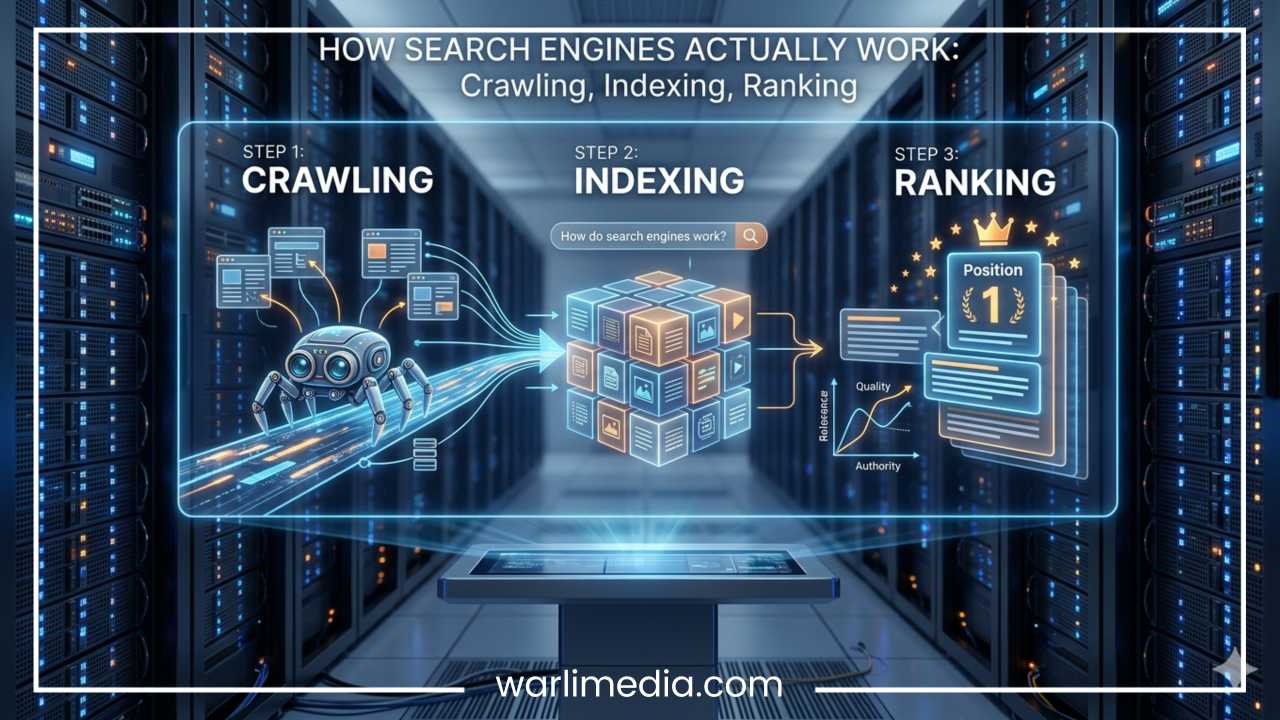
In the vast ecosystem of the internet, search engines act as the primary librarians of the digital age. They send out automated software—known as crawlers, bots, or spiders—to traverse the web, read page content, and index it so that it can appear in search results. However, not every page on a website is meant for public viewing. Some pages are administrative, others are private, and many are simply functional.
This is where the robots.txt file enters the picture. It acts as the gatekeeper for your website, providing essential instructions to search engine crawlers about which areas they are permitted to access and which they should avoid. Despite its critical role in technical SEO and web management, it is often misunderstood. Many website owners mistakenly believe that robots.txt is a security tool or a way to keep content hidden from the world. In reality, it is a communication protocol, and understanding how to use it correctly is fundamental for anyone looking to optimize their site for search engines.
Read: Dominate Twitter: The Ultimate Guide to Twitter Management Tools
What is Robots.txt?
At its core, a robots.txt file is a plain text file that resides at the root level of a website’s domain. It is an integral component of the Robots Exclusion Protocol (REP), a set of web standards that regulate how robots interact with websites. When you type your domain followed by /robots.txt into your web browser, you are accessing this file.
It serves as a conversational tool between your server and the search engine. When a search engine bot—such as Googlebot—arrives at your site, the very first thing it does is look for this file. It acts as a set of ground rules. It tells the bot: “You are welcome to crawl these sections, but please stay out of these specific folders.” Because this file is requested before any other content on your site, it is the most efficient way to manage how your server resources are used by search engines.
It is important to note that robots.txt is not a requirement for a website to exist, but it is a requirement for professional site management. Without it, search engines will assume they have permission to crawl every single page they can discover, which can lead to indexing issues and wasted server resources.
Read: Twitter Marketing: The Ultimate Guide to Engage & Grow Your Brand
How Robots.txt Works
The process of a bot navigating your site is a carefully ordered sequence. When a search engine crawler encounters your domain, it executes a specific series of steps:
Site Discovery: The bot arrives at the root of your domain.
The Handshake: It immediately sends an HTTP request to locate and fetch your robots.txt file.
Parsing: It reads the instructions contained within that file line by line.
Compliance: It follows the directives defined for its specific user agent (or the default ones if none are specified).
Navigation: It proceeds to crawl the allowed pages, while actively skipping everything explicitly disallowed.
This process is vital for managing your crawl budget—the amount of time and resources a search engine is willing to spend crawling your pages. Every website has a limit to how much a crawler will investigate within a given timeframe. By preventing bots from visiting thousands of low-value, duplicate, or resource-heavy pages, you ensure that the search engine focuses its limited attention on your most important content. Furthermore, it helps manage server load, as you can prevent bots from hammering your database with intensive requests, such as complex filtering, internal search results, or dynamic calendar views.
Read: Social Media Marketing: The Must-Have Tool for Modern Businesses
Why Robots.txt is Important for SEO
For search engine optimization (SEO), robots.txt is a high-impact tool. Its primary utility lies in efficiency and technical hygiene. If a search engine is busy crawling irrelevant pages, it may not discover your new, high-quality content as quickly.
Key SEO benefits include:
Managing Crawl Budget: By blocking unnecessary pages, you push crawlers toward the content that actually matters to your users.
Preventing Duplicate Content: By blocking search result pages or filtered views, you prevent search engines from indexing multiple versions of similar content.
Protecting Server Resources: It keeps bots away from memory-intensive scripts or internal tools that provide no SEO value.
Improving Indexing Efficiency: A clean site structure is easier for crawlers to navigate, which can indirectly lead to better ranking signals.
There is, however, a critical misconception that must be addressed: Blocking a page in robots.txt does not guarantee that it will be hidden from search results. If a page is blocked by robots.txt, Google cannot crawl it, but if other websites link directly to that page, Google may still index the URL and show it in search results without having seen the content. If you truly want to prevent a page from appearing in search, you should use the “noindex” meta tag instead of relying solely on robots.txt.
Robots.txt Syntax Explained
To control crawlers, you must use the specific syntax defined by the Robots Exclusion Protocol. The file is case-sensitive and relies on a few core directives that must be structured correctly to be effective.
User-agent
This identifies which specific crawler the rules apply to. You can target specific bots or use an asterisk as a wildcard to target all of them.
Example:
User-agent: Googlebot(Targets only Google)Example:
User-agent: *(Targets all bots)
Disallow
This is the command that tells the bot not to visit a specific URL or directory.
Example:
Disallow: /admin/(Blocks everything in the admin folder)
Allow
This directive is used to override a Disallow rule. If you have blocked a parent folder but want to make a specific sub-folder available, you use Allow.
Example:
Disallow: /wp-content/followed byAllow: /wp-content/uploads/(Blocks the content folder but keeps the uploads visible)
Sitemap
You can include the location of your XML sitemap here to help search engines find your important pages faster.
Example:
Sitemap: [https://example.com/sitemap.xml](https://example.com/sitemap.xml)
Crawl-delay
Some crawlers respect a crawl-delay, which dictates how many seconds a bot must wait between requests to prevent server strain. Note that Google explicitly ignores this directive.
Common Robots.txt Examples
Practical application is the best way to understand these rules. Below are common configurations you might encounter in professional environments.
Example 1: Blocking the entire site from everyone
Used when a site is still in development or maintenance mode.
User-agent: *Disallow: /
Example 2: Allowing everything
If you want total transparency, this is the default state for many websites.
User-agent: *Disallow:
Example 3: Blocking a specific, aggressive bot
Used to keep high-traffic, non-essential scrapers off your site to protect bandwidth.
User-agent: AhrefsBotDisallow: /
Example 4: WordPress-style restrictive configuration
Many WordPress sites use this to protect backend directories while allowing site functionality.
User-agent: *Disallow: /wp-admin/Allow: /wp-admin/admin-ajax.php
Example 5: Blocking all search results
Prevents internal search query pages from being indexed.
User-agent: *Disallow: /search/
Robots.txt vs. Meta Robots Tags
It is common to confuse these two, but they serve entirely different purposes and operate at different layers of the crawling and indexing process.
| Feature | Robots.txt | Meta Robots Tags |
| Primary Goal | Controls Crawling | Controls Indexing |
| Scope | Site-wide / File-level | Page-level |
| Visibility | Bots see it before entering | Bots see it after loading page |
| Result | Prevents access | Prevents search appearance |
If you want to stop a page from showing up in search results, you must use a meta tag with noindex. If you simply want to stop a bot from wasting time on a page that doesn’t need to be indexed—like a printer-friendly version of a page—use robots.txt.
Robots.txt vs. XML Sitemap
Think of these two as the “Stop” and “Go” signals of your website’s relationship with search engines.
Robots.txt is a “Do Not Enter” sign. It tells bots where they are forbidden to go.
XML Sitemap is a “Points of Interest” map. It tells bots exactly where you want them to visit and provides metadata about when those pages were last updated.
They work best in tandem. Use robots.txt to keep the crawler away from junk files, and use the XML sitemap to ensure the crawler visits your most important landing pages. Never block the pages you include in your XML sitemap in your robots.txt file, as this creates conflicting signals that confuse search engine algorithms.
What Should You Block and What Should You NOT Block
What to block:
Admin/Login directories: Keeps bots from trying to crawl pages they cannot access anyway.
Internal search results: Prevents index bloat from dynamic search queries.
Filtered/Parameter URLs: Prevents thousands of unique URLs from being indexed for the same content.
Staging environments: Essential to prevent a test version of your site from competing with your live site in search rankings.
Temporary files: Any auto-generated files or scripts that are not user-facing.
What NOT to block:
CSS and JavaScript files: Search engines need these to render your page correctly. If you block them, Google may not be able to “see” your site as a human does. If the crawler can’t render your layout, it cannot accurately rank your site.
Important content pages: If you block it, you are effectively telling search engines not to index it.
Images: Unless there is a specific reason (such as copyright protection or bandwidth management), you generally want images to be crawled for search visibility.
Common Robots.txt Mistakes
Even experienced developers fall into these traps, often with catastrophic SEO consequences.
Blocking the entire site: Accidentally adding a forward slash
Disallow: /while the site is live is the most common cause of sudden traffic drops. It essentially tells every search engine to get out.Blocking CSS/JS: This often happens when developers try to block a folder like
/wp-includes/without realizing they are also blocking critical layout files.Case sensitivity: Remember that
Disallow: /Admin/is not the same asDisallow: /admin/on Linux-based servers. Always match the case of your folders exactly.Using it for security: Never put a private password-protected directory in your robots.txt. It only tells hackers exactly where your sensitive folders are. It is the digital equivalent of putting a “Private” sign on a door; it doesn’t lock the door.
Forgetting wildcard usage: Failing to understand that
/is not the same as/*can lead to some pages being blocked and others being left wide open.
How to Create and Test a Robots.txt File
Creating the file is a straightforward technical task. Open a standard text editor (like Notepad, TextEdit, or VS Code), write your directives, and save the file as robots.txt. Ensure the encoding is UTF-8 to avoid character errors.
Once saved, upload it to the root folder of your website via FTP or your file manager. It must be accessible at [yourdomain.com/robots.txt](https://yourdomain.com/robots.txt).
To test, you should always use a validation tool before going live. Google Search Console has a built-in robots.txt tester that allows you to input a URL and see if it is blocked by your current rules. Many third-party SEO crawlers also provide this functionality. Testing is the most important step because a single syntax error can render your entire file useless or, worse, block your entire site.
Best Practices for Robots.txt
Keep it minimal: Don’t add rules you don’t need. Complexity is the enemy of reliability in robots.txt.
Add comments: Use the
#symbol to add notes so you know why you blocked a specific directory months later.Include your sitemap: It is the standard way to inform bots about your site structure.
Audit regularly: As your site evolves, update your robots.txt to ensure you aren’t blocking new, important sections or leaving old ones exposed.
Use absolute paths: Always define paths starting from the root to ensure there is no ambiguity.
Robots.txt for CMS Platforms
Modern Content Management Systems handle robots.txt differently, often automating the process to protect users.
WordPress: Creates a virtual robots.txt file by default, but you can override it with a physical file or a plugin like Yoast or RankMath. If you are using a plugin, be careful not to create a conflict by uploading a manual file as well.
Shopify: Automatically generates a robust robots.txt for your store. It is generally recommended to keep the default settings unless you have a high-level technical requirement for custom routing.
Wix: Allows for some customization through the “SEO Tools” dashboard, though it manages most of the file automatically to prevent critical errors.
Advanced Techniques
For larger websites, you can leverage advanced syntax to control traffic with surgical precision.
Wildcards: Using the
*symbol allows you to block patterns. For example,Disallow: /*?sort=will block all URLs containing the sort parameter, regardless of the folder. This is highly effective for e-commerce sites.End-of-line anchor: The
$symbol signifies the end of a URL.Disallow: /*.pdf$will block every PDF file on your entire site, saving significant crawl bandwidth for content-heavy sites.Bot-specific rules: If you want Google to see your site differently than how Bing sees it, you can create user-agent blocks for each. However, keep in mind that most major search engines follow the same standard rules.
Real-World Case Studies
Consider an e-commerce site with a massive faceted navigation system. Every time a user filters by color, size, or price, a new URL is generated. Without a well-configured robots.txt using parameter blocking, Google might crawl millions of near-identical pages, resulting in a crawl budget crisis where the “real” product pages are ignored. By simply adding a rule to disallow the filter parameter, the site’s indexation performance often improves dramatically, leading to higher rankings for core product pages.
Another example is a news publication that produces thousands of articles. By using robots.txt to keep the crawler away from archive-by-date pages and focusing them on the sitemap, the publication ensures that breaking news is indexed within seconds of publication.
The Future of Robots.txt
As the web moves toward an AI-driven future, robots.txt is becoming even more relevant. We are seeing a rise in “AI crawlers”—automated agents tasked with gathering data for large language model training. Webmasters are now using robots.txt to opt-out their content from being used in AI training datasets. While this is still a developing area of web standards, the importance of controlling who visits your site—and why—is only going to grow. We may eventually see more granular controls that allow site owners to separate “Search Indexing” from “AI Learning,” giving us back more control over our digital presence.
Final Thoughts
The robots.txt file is one of the most powerful, yet accessible, tools in an SEO specialist’s arsenal. It is the first line of communication between your website and the search engines that drive your traffic. While it is not a security tool and should not be used as a blunt instrument to hide sensitive content, it remains essential for crawl efficiency, technical health, and managing server resources.
By understanding the syntax, avoiding common pitfalls, and regularly auditing your directives, you ensure that your website remains a clean, efficient, and well-indexed destination in the eyes of search engines. Always remember: guide the crawlers, and they will help your users find you. Every website owner should understand the basics of robots.txt before making any significant SEO changes, as this simple text file is the foundation upon which your search engine visibility is built.
Understanding the Robots Exclusion Protocol: A Summary Table
| Directive | Function | Best Use Case |
| User-agent | Defines the bot target | Specifying Googlebot vs. others |
| Disallow | Blocks access to a path | Admin/Login/Staging areas |
| Allow | Overrides a disallow | Opening sub-folders in a blocked parent |
| Sitemap | Points to your sitemap | SEO discovery |
| Wildcard (*) | Matches any sequence | Blocking specific URL parameters |
| End-of-line ($) | Defines exact URL end | Blocking all files of a certain type |
Understanding these components will allow you to maintain full control over how your website is interpreted by the world’s most powerful search engines. Do not underestimate the value of a well-maintained robots.txt file—it is often the difference between a site that is properly indexed and a site that is struggling to be found.
Frequently Asked Questions About Robots.txt
Does a robots.txt file prevent my content from appearing in Google search results?
No, a robots.txt file is not a tool for de-indexing or privacy. If you use the Disallow directive, you are only telling search engines not to crawl the page. However, if other websites link to that blocked page, Google can still index the URL and display it in search results without having seen the page content. If you want to completely remove a page from search results, you must use the noindex meta tag instead.
Can I have multiple robots.txt files on one domain?
No, you can only have one robots.txt file, and it must reside in the root directory of your domain (e.g., yoursite.com/robots.txt). If you place a robots.txt file in a subdirectory, search engine crawlers will ignore it. All rules for every subdomain or folder must be contained within that single, primary file.
What happens if I make a mistake in my robots.txt file syntax?
A syntax error in your robots.txt file can have serious consequences. If you accidentally write Disallow: / instead of Disallow: /admin/, you are telling every search engine to stop crawling your entire website. If you include an extra space, a typo in the directive name, or invalid characters, the crawler might ignore the rule entirely or misinterpret it, leading to either crawl bloat or accidental de-indexing of your important pages. Always use a validator tool before saving.
Should I block my CSS and JavaScript files in robots.txt?
Absolutely not. Modern search engines like Google need to “render” your pages to see how they look and function, just like a human user. CSS and JavaScript files are essential for this rendering process. If you block these files in your robots.txt, Google may not be able to read your layout or execute your scripts, which will result in poor mobile usability, broken search snippets, and significantly lower rankings.
Why does Google suggest that I don’t need a robots.txt file?
Google states that a robots.txt file is optional if you want search engines to crawl and index every single page on your site. However, most professional websites are not that simple. You likely have admin dashboards, checkout pages, internal search queries, or staging environments that you do not want to be indexed. Therefore, while technically “optional,” a robots.txt file is considered a best practice for almost every website to maintain crawl efficiency and protect server resources.
How do I check if my robots.txt file is working correctly?
The best way to verify your configuration is through Google Search Console. Navigate to the “Robots.txt Tester” (if available in your dashboard version) or simply submit your URL to the Google URL Inspection tool. You can also use third-party SEO crawling software like Screaming Frog or Ahrefs to perform a site audit, which will flag any pages that are currently blocked by your robots.txt but might be unintentionally losing SEO value.
Can I use robots.txt to stop AI scrapers and GPT bots?
Yes, many website owners are now adding directives to their robots.txt to specifically block AI-training crawlers. By identifying the user-agent strings of known AI bots (such as GPTBot or CCBot), you can add a Disallow rule to prevent them from accessing your content. Note that this is a voluntary standard, and while reputable AI companies respect these rules, some less ethical scrapers may ignore them.
Is it safe to put sensitive information in my robots.txt file?
Never put sensitive information or URLs for private pages in your robots.txt file. A robots.txt file is public; anyone can view it simply by typing your URL followed by /robots.txt. By listing a “private” directory here, you are essentially providing a roadmap for malicious actors to find your admin pages or vulnerable staging folders. Use password protection (HTTP authentication) or server-side security to protect sensitive content instead.